02 June 2009

Browser wars


Someone recently asked me what I thought the best browser was. "They all have their pros and cons." I told him. When he asked me why I didn't mention Internet Explorer, it reminded me of an article I read a while ago.


Although the majority of the world uses Internet Explorer (IE6 too, you would think people would switch already, I mean, we're on IE8, geez), it would be better if they didn't use it.

Internet Explorer is easily exploited by the internet nasties and can compromise your entire system right there. IE is a major security risk, and that should be a big enough reason to switch right then and there.

IE is also very bad when it comes to add-ons. Compared with other popular browsers such as Mozilla Firefox and Opera, it has little room for customization, and often times the addon you can't be found for IE.

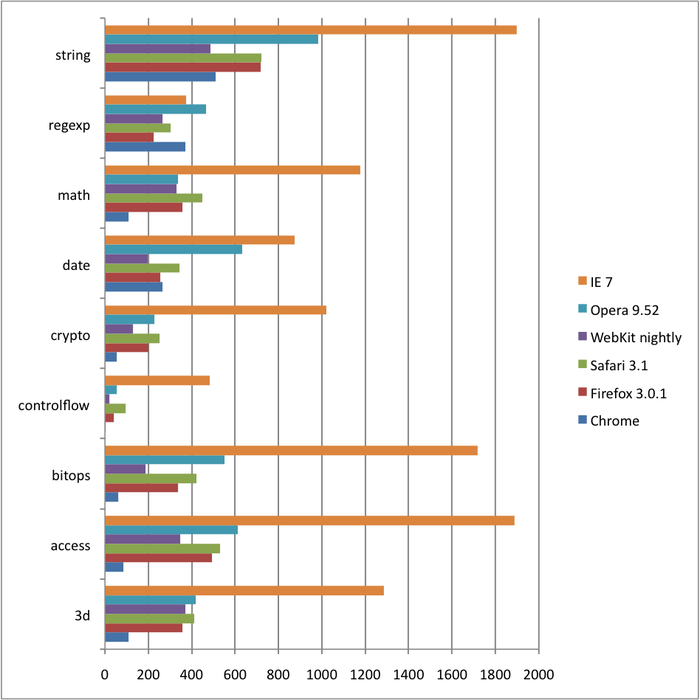
Speed. We all love speed. In the age of technology, we want things to go as fast as possible. Although IE8 does load fast on initial startup, it fails pretty much everywhere else. It also has poor memory management and can take up a good chunk of your RAM with just a couple of tabs open. Recent javascript tests performed on popular browsers (IE, Firefox, Opera, Safari, Chrome) show that IE comes in dead-last, so there's a great incentive to switch.

If you've never tried Firefox, I suggest you do. Its got all the bells and whistles you'll ever need and customization is simple (just go to addons.mozilla.org and with the click of a button, get whatever you need). It is also pretty fast, and we can expect even more speed with the release of Firefox 3.1 with their new javascript engine Tracemonkey.

Chrome is a new browser from Google (and we know Google makes good stuff). Although relatively new in the browser wars, it is quickly gaining support and boasts as being the lightest and quickest browser around. I can testify to that, but the lack of addons at the moment makes me reconsider.

Javascript benchmarks


So if you're still stuck with IE, you should make the change now. I realize it might be a bit scary to make the jump, but once you do, you'll feel a lot better about it. Trust me, I used to think that Internet Explorer was the one and only browser for me, until I was convinced to try Firefox.
Microsoft is coming out with another iteration of 'Office'. The technical preview was leaked out a while back on torrent sites and I can tell you this much, the changes aren't too great. We have the same ribbon look as Office 2007, and everything else we've seen before is here, but I suppose there are some minor improvements.


Office 14 (2010) is scheduled for release in March 2010.

Here are some pictures:
Ribbon Look

If you don't feel like buying one of Microsoft's expensive products, you can always use Openoffice.org (its free and it works just as great as Microsoft Office. It can also open in .docx or .pptx, etc.)

After months of leaks and beta testing, Windows 7 is scheduled to be released on October 22nd. There was some speculation earlier on about when Microsoft's latest operating system would be released and many thought that it would be around for the holiday season.


Windows 7 is definitely an improvement over Vista. Unlike before, users are actually looking forward to this new iteration as it promises better functionality and performance, as well as a new look. The release candidate is definitely a lot more stable than Vista's early days.

There is also the matter of pricing. As we all know, money is a bit hard to come by these days, and people are questioning whether or not the upgrade will be worth it. If Windows 7 is anything like Vista, the 'Ultimate' version will be priced at a couple hundred bucks. My advice: If you really want it, buy a new computer. Upgrading just isn't worth it.

This new OS might just signal the end of XP. In terms of speed, W7 is definitely faster and lighter on system resources. We'll just have to wait and see.


One thing I notice with the average user's computer is that their harddrives are never defragmented.


The harddrive gets fragmented over long periods of use, and if not properly 'defragmented', can cause a slowdown in system performance. Although Windows does come with its own defragment utility, it is not as effective and the time it takes to finish a complete defrag of the system can range from a couple hours to over a day. Although the defrag program that comes with Vista is a lot better than the one in XP, it still lacks features that 3rd-party software contains.

Paid software:
This is my absolute favorite. It has all the features you can possibly need to defrag your harddrive and it automatically defrags files in the background for you. Install and forget is what this program can do. It keeps your harddrive and files in tip-top shape, but at the cost of $29.95

O&O Defrag is definitely a lot more expensive than Diskeeper (at $49.95). Since it is $20 more, you'd expect $20 worth of stuff more. Well, you won't, but it is still a good program nonetheless.

Free software:
1. JK Defrag [http://jkdefrag.com/]
Its free, its simple, and a simple click on the icon will start a complete defrag. It gets the job done just as good as commercial software, but it lacks features such as scheduling, background defrags, defrag by last use, etc.

A good product that was recently updated. It has a nice GUI and tells you the amount of defragmentation before and after. It works extremely fast for a defrag program (which leads some to doubt its effectiveness) but its a good program to use for a quick manual scan to eliminate the more fragmented files.

3. Defraggler [http://defraggler.com/]
A relatively new defragment program by the software company Piriform. It has more options than the other free software programs and you can choose to defragment individual files and folders too.